| KroyTech | ||
| Top Sites, Help and Tech Support | ||
|
|
Top Sites, Help & Free Tech Support Page |
|
TOP SITES, HELP AND TECH SUPPORT MENU |
|||
|
|
|
||
|
Other Stuff |
|||
|
Ÿ
Jesus and Eternal
Life |
|||
**Warning: Top Sites and Help page is HUGE (over 300k). Please give it time to fully load.
If you have a Broadband connection (DSL or Cable) it will be almost instantaneous.
|
. This site is best viewed at 800x600 display resolution
|
||||||||
|
How to fast scroll with your keyboard...
If your scroll keys don't work on a web page, try clicking on the page with your mouse first to make the page "active". You can also click and "drag" the gray scroll button on the far right of your screen up and down to move quickly through the page. (Hold your left mouse button down on the gray scroll button and "drag" it up and/or down.) For ALL known Windows keyboard shortcuts, see Microsoft's keyboard shortcuts table. You can usually use your ïBack button (top left of your browser) to go back to previous links. |
America Under Attack -- Some helpful words...
![]()
ØReference: Some of the best and most popular computer and online reference sites on the Internet.
ØInternet Search: Lists the most popular and effective search engines.
ØTutorials, Help, Viruses & More and Tech Support sites: The best of the best free help, tutorials, and tech support sites for new and beginner level computer users. (And lots of good stuff for the more advanced!) If you need to know where to go to get free or low cost help, or you want to learn more about your computer and the Internet, these are the sites to visit. I have compiled the best of these sites in such a way that you as a new or beginning computer user can learn step by step how to become a pro with your computer and the Internet. (There are many other excellent tech sites not listed here that cover more technical aspects of computing and the Internet, but would be beyond the scope of what this website is about right now.)
ØFeatured Sites: Specially selected sites you should know about.
ØJesus and Eternal Life: About Jesus and eternal life, lots of links and comments.
ØEverything Else: Some helpful and fun sites that have been carefully chosen to give you a hint, a tiny glimpse of the kinds of things you can find, use, and do on the Net.
|
TOP SITES, HELP AND TECH SUPPORT MENU |
|||
|
|
|
||
|
Other Stuff |
|||
|
Ÿ
Jesus and Eternal
Life |
|||
![]()
REFERENCE
& INFO SITES
Main Menu | Top
of Page
What's here?
Some of the best and most popular reference sites on the Internet.
Computer Reference Sites
Smart Computing (in Plain English): A must visit for all computer users.
Price Watch: Compare street prices from many online computer/electronics stores. Displays the most current prices on everything relating to computers, peripherals and electronics. Prices are submitted to Price Watch by retailers.
Shopping.com: Probably the most popular product price comparison and review site. Prices are submitted to Shopping.com by retailers.
CNet Shopper.com Price Scanner: Another site for checking the latest street prices. Prices are submitted to Shopper.com by retailers.
Blue Book for Everything: The current "fair market values for the most popular products based on actual transactions from online auctions and prices from online retailers. Strong Numbers sorts the raw data into specific related categories based on how consumers actually search for products." (But never depend on one source for current prices. Just searching Google can turn up prices that don't show up in these services.)
ZDNet: One of the popular computer resources on the Internet. (Used to be the one of the biggest and best, but they have downsized.)
ZDNet Reviews: Lots of product reviews by ZDNet. See also ZDNet's Editor's Top Products. A good place to start, but always look at several sources for reviews when researching a product or solution you are considering.
PC Magazine Online: One of the popular computer magazines in the industry. (But watch for a little too much favoritism to their advertisers.)
Webopedia:ïNew window Definitions for every computer term ever invented (almost)! A bit technical sometimes, but clicking on the underlined "hypertext" links can help. ("Hypertext" links are what tie the whole World Wide Web together. Look up hypertext by clicking on it.) Know what "MODEM" stands for? Here's DSL and broadband. What is a "computer" anyway? Do you know what "software" is? What is a program? How about CPU, BIOS, CMOS, USB, CD-ROM, CD-RW, and DVD? What does "boot" your computer mean? (No, it doesn't mean kick it.) What do "Internet" and "World Wide Web" mean? Where did "bugs"come from (the ones computers get, that is)? What's the difference between megabytes and gigabytes? Microsoft Windows is a GUI ("gooey") based operating system. What is that? If you have an older version of Windows (9x thru ME), it actually runs on top of another much older, basic operating system originally developed for the first IBM PC in 1981 called DOS. I'm sure you know that PC stands for "personal computer", but how did it all begin? And finally, what's a FAQ? (Here's a sample comparison of DSL speeds from BellSouth.)
Webopedia Did You Know? ESD (Static Electricity) and Computers: A good brief in lay terms on what you should know about Electrostatic Discharge (static electricity) and computers.
What is...: More definitions for every conceivable "computereez" term, very thorough.
Online Reference Sites
Internet Public Library: One of the best collections of quality online references and resources in every conceivable category. Reference websites, online encyclopedias and reference works, exhibits, magazines and newspapers, etc. etc.
Internet Public Library Reference Resources: Dictionaries, encyclopedias, almanacs, biographies, experts & how to, genealogy, geography, news resources, periodical directories...
Librarians' Index to the Internet: One of the best sources of information and reference. Open the page to see what's here. Under each category, be sure to click on "more" to see the entire category listing!
Librarians' Index to the Internet - Ready Reference and Quick Facts: Dictionaries, encyclopedias, almanacs, biographies, experts & how to, genealogy, geography, news resources, periodical directories...
eLibrary.com: Very comprehensive online library, "premium" articles available with subscription.
Refdesk.com: One of the best places on the Internet for facts, info, and reference resources about anything.
Reference.com: One of the best places on the Internet for reference resources (online almanacs, dictionaries, thesauruses, encyclopedias, literature databases, etc).
OneLook Dictionary: Searches more than 731 online dictionaries for your word or phrase. Dictionaries in seven languages are available. Be sure to note the "hints" given below the search box for truly effective ways to find what you want!
FindArticles.com: "A vast archive of published articles that you can search for free. Constantly updated, it contains articles dating back to 1998 from more than 300 magazines and journals."
Encyclopedia Britannica Online: By far the most thorough of the online encyclopedias, but... They now charge a fee to view articles. (You can buy the entire Encyclopedia Britannica Deluxe edition on CD-ROM for as little as $25 when it's on sale, which I would highly recommend!)
Microsoft Encarta Encyclopedia Online: You now have to pay a fee to view many articles, unless you own the CD version.
Encyclopedia.com: Part of eLibrary.com. Probably provides the most free content of the subscription based encyclopedias. Additional articles available upon subscription.
Wikipedia: The Free Encyclopedia (English): "Wikipedia is a multilingual project to create a complete and accurate open content encyclopedia." Started in January 2001, there are over 1 million articles in the English version and growing at the rate of about 1,700 articles per day (from ZDNet). This online encyclopedia is constantly improving and becoming very comprehensive. It is the MOST comprehensive of any free online encyclopedia and is actually copied by many other websites on the Net. Anyone can contribute to or create an article. The quality and accuracy can be very poor to excellent. Note that "truth" is NOT in their interest, "The threshold for inclusion in Wikipedia is verifiability, not truth," and that Wikipedia "...does not publish original thought or original research [nor allow it]." (From Wikipedia's Official Policy on Verifiability.) You should check your research in Wikipedia against more established works, such as the latest releases of commercial encyclopedias and reputable news sources who DO have truth in reporting and research as their aim/interest. (And correct Wikipedia's articles when you find anything wrong. J )
Answers.com: Highly categorized, comprehensive "answers" on any reference topic you are searching for. See Why Answers for a good description of what this site is about as compared to other reference sites. (Uses Wikipedia as one of many of it's sources for articles.)
Spartacus Educational Reference: Educational and history reference
Historyplace.com: History reference
World History: History reference. Guess what my favorite subject is? (Next to prophecy and eternal life, that is. You need to look in both directions to know where you're going!)
American Secular Holidays Calendar
: Official American holidays for any year past, present or future.
Online Locators
Online "yellow pages", Maps, Zip Lookup
These people/business finders are white and yellow pages on steroids. Very powerful ways to look up any company or person (if listed), including reverse lookup by phone no, and other options.
AT&T AnyWho: Find addresses, phone nos., businesses, etc. (if listed)
Switchboard: One of the most popular and complete people/business finders on the Net
SmartPages: Another good people/business finder. (If you can't find what or who you're looking for on one site, try the others.)
Maps On Us: Detailed street maps of any address in the US. Includes detailed, customizable to your traveling preferences, turn by turn route planner. Very customizable, and you can save your customizations and preferences.
MapQuest: Detailed street maps of any address in the US and other countries. This one often provides a lot more detail than Maps on Us, and has been more accurate in some cases. Also, includes arial photo view, customizable, turn by turn route planner with various options and features to make it as easy as possible to find your way with their maps.
Google Maps: Similar to the others (each has their strengths and weaknesses), but fancier, slicker, overlay street maps over satellite/photo images, drag the map with your mouse, covers the entire globe. Or just type an address with commas in the Google search bar (eg 4550 nw 18th ave, pompano beach, fl) or a phone no.
US Postal Service Zip+4 Lookup
US Postal Service Postage Calculator
![]()
INTERNET SEARCH
Main Menu | Top
of Page
What's here?
The best and most popular search engines. These search engines vary in their comprehensiveness. No one search engine indexes more than 20 to 30% of the total content of the World Wide Web.
You'll get much better satisfaction from searching the Internet if you spend a few minutes learning how to use these tools. Many of the searches done on the Internet bring up tons of results, yet miss most of the best websites or pages containing what the searcher is really looking for.
For example, with most search engines, sometimes using double quotes (") around exact phrases you are looking for, such as <"gettysburg address"> (ignore the pointed brackets < >), gets you the web pages containing that exact phrase, leaving out a lot of junk that has nothing to do with your search. However, for a topic such as <scanner help>, you're better off not using quotes. There's much more you can do to get the best pages containing just what you're looking for, but that's a start. Most search engines have "help" links or "hints" that give you a brief list of tips to make the search work better for you.
Google: Currently the most popular search engine on the Net. Very fast, and usually gives the most results or "hits". Try Google Advanced for advanced options. Will also find addresses with maps if you type in an address. Google Answers even connects you to an expert Google researcher who will do research for you (for a small fee). You pay them if and when you're satisfied.
Google - All services, specialized search and tools: Over 35 useful services, tools and free utilities and growing.
Yahoo: Yahoo is far more than a search engine or index. This is what is known as a "portal" -- an array of many resources and services.
Ask.com: Formerly AskJeeves.com. Easy to use, very thorough, plain English search engine that searches the search engines. Quoting from ZDNet:
"Ask.com [has] a new customizable "toolbox" with shortcuts to 10 default search tools including maps, images, weather, dictionary and local search.
Ask.com also has beefed up its maps and driving directions tools to add walking directions, dragable location pins that automatically recalculate directions, the ability to right-click on a spot on a map to add it to a route, aerial photography that can be combined with regular street views, and the ability to print aerial shots for a fee.
The new tools also include encyclopedia search that displays direct answers from Wikipedia, Houghton Mifflin and others at the top of the results page, and Web-based desktop search for looking for information on the computer's hard drive. The company already offers a standalone desktop search application."
Basically, ask.com is trying to match and even go beyond Google.Alltheweb: Very thorough, and very fast
Dogpile: Searches all the major search engines. Use this if nothing else finds what you're looking for.
![]()
FEATURED SITES
Main Menu | Top
of Page
What's here?
Specially selected sites you should know about.
Featured Sites of the Month: Featured sites for this month: CNet's Internet Price Scanner, Price Watch, Buy.com, Best Buy, Mr. Ink Jet, ComUSolv.
Integrity.com: Integrity is a good, family-safe internet provider. They protect you and your family from unsafe and obscene websites and email, spyware, viruses and spam (junk email). They state that their service, "will effectively shield you from over 99% of the most objectionable web material." Its not perfect (nothing is) -- you still need the standard firewall and protection software installed on your computer. Their "email filtering technology will stop over 90% of your email spam and protect you from 99.9% of all email viruses." High speed dial-up (5-7x faster overall than standard dial-up, except email and file downloads) ($22/mo) or DSL ($49/mo). Or add their internet filter software to your existing service ($50/yr for up to 3 PCs). They use Netsweeper for their filtering service.
Pros: Probably about as good and balanced a filtering provider service as you will find at these prices. Good internet and email protection. No special software to install. Phone support, but some long hold times at peak hours (as with any service). Their DSL service includes basic computer support as well.
Cons: DSL service is slow (relatively) and pricey ($49/mo.) at 384kbps (kilobits per second) compared to others. (Christian-Net is $50/mo. for 1500k/256k, $60 for 3000k/384k compared to non-filtered DSL with Bellsouth FastAccess DSL Xtreme at $38 for 3000k/384k.) ALL internet chat rooms/services are blocked. No custom "white list" or "black list" capability. They will take requests to make blocked websites available or to block websites you want blocked, but they make the final decision. You can't turn off the protection service if you want temporary total access to the internet. (Other family-safe providers are more flexible but may cost more.) Can be bypassed by connecting to an alternate internet provider. (Someone would need a credit card or PayPal account or be able to send money to the alternate provider to sign up and connect. However, this would not work if you purchased Integrity's protection software instead of the service.) Support staff does not seem particularly computer-knowlegable, but adequate for basic support.
Finally, If you need more flexibility to modify what's blocked and what isn't, you can obtain or use any standard internet service and add Integrity's software for $50/yr. You can then also disable the protection software with a password if you ever need total internet access, but a real computer-knowledgeable kid can bypass the software if he/she tries hard enough. Plus, you can't control what they're doing at their friends' houses. The bottom line is that you still need to watch your kids and know what they are doing, and ideally, be able to trust them. Those who are technically skilled and determined to get around it can, but this makes it more difficult. This type of service can be a great help to protect everyone, but as everything else, is not perfect.
Previously Featured Sites
Mister InkJet: Discount printer supplies, hi res. & photo quality paper & card stocks, compatible printer cartridges. All inks are custom formulated by Mister InkJet for each printer model to duplicate the formula used by the original manufactures such as HP, Epson and Canon. They provide first-class tech support if you have any problems. Discount prices on ink jet supplies. An Epson Stylus 600 compatible black ink jet cartridge is $8. Retail is $24.95.
Click here to find out more.MyInks.com: Discount inkjet cartridges. Usually has the lowest prices, depending on the quantity ordered. Be alert to the lower quality of ink. Your print quality may not be as good as the real thing.
![]()
Free Tutorials, Help, Virus Info, and More
Main Menu | Top of Page
For fast up and down scrolling
1. Use your [Page Up] and [Page Down] keys on your keyboard.
2. Use your [é] [ê] arrow keys for line by line scrolling.
3. Hold them down for fast repeat.***Note on links to Virtualdr.com***: All tutorial services at virtualdr.com have been discontinued. All links to these are no longer valid. I will be removing and/or replacing those links in the future.
What's here?
These free tutorial training, anti-virus, and help sites cover just about everything you need to know to become a real pro with your computer and the Internet, and stay protected from virus attacks. Some are even kinda fun! Most of them are also good reference sites you can come back to any time you need help with something. Bookmark the ones you find useful into your Favorites so you can go back to them easily.
Most of these are free. There are many fee-based online training sites that offer their courses on the Net for a small charge that are better. I have chosen at this point just to list the training sites that don't cost you anything, and many of them are just as good or sometimes better than the fee based ones. Support them every way you can, as they can't go on for ever without some way to pay the bills.
|
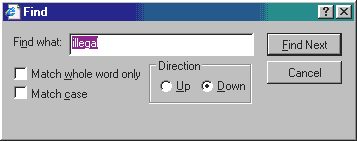
How to use your computer's search or "Find" feature on this
page
Press <Ctrl>-F
On your keyboard, press <Ctrl>-F (together) or at top left, click "Edit", then "Find". Type a word (or part of a word) in the Find what box, such as "illegal" (for "Illegal operation error") and press your <Enter> key (or click [Find Next]). This searches "down" the page. For "training", use "train" which will find all forms of the word. You can keep pressing <Enter> or clicking [Find Next] in the Find box as many times as you want, until you get a "Finished searching..." or "...not found" message. In the "Direction" box, you can then click "Up", and then [Find Next] to search back up the page. Press your <Esc> key or [Cancel] to close the Find box. You can do this on any website. |
|
. More About Training/Tutorials
and Technical Support
How to "bookmark" a website in your Favorites menu
|
Getting Started
Back to Tutorials, Help and Viruses Menu
KroyTech - Web Surfing Tutorial: What is a link? How do you (easily) go back to a previous web page? What is a browser? What to do about blank or garbled web pages. Common Internet and computer errors will be covered soon!
Jan's Illustrated Computer Literacy 101: Nicely done basic tutorial taken from lessons which this site owner taught in her computer literacy coarse at a state college in Tennessee.
EzInstructions.com: Basic instructions on Windows, your computer hardware, and some popular programs.
DISCONTINUED -- virtual Dr - The Basics Tutorial
DISCONTINUED -- virtual Dr - Up and Running Tutorial
DISCONTINUED -- virtual Dr - Computer Basics (Main Menu)
Webopedia:ïNew window Definitions for every computer term ever invented (almost)! A bit technical sometimes, but clicking on the underlined "hypertext" links can help. ("Hypertext" links are what tie the whole World Wide Web together. Look up hypertext by clicking on it.) Know what "MODEM" stands for? What is a "computer" anyway? Do you know what "software" is? What is a program? How about CPU, BIOS, CMOS, USB, CD-ROM, CD-RW, and DVD? What does "boot" your computer mean? (No, it doesn't mean kick it.) What do "Internet" and "World Wide Web" mean? Where did "bugs"come from (the ones computers get, that is)? What's the difference between megabytes and gigabytes? Microsoft Windows is a GUI ("gooey") based operating system. What is that? Windows runs on top of another basic operating system called DOS (Windows version 9x thru ME, that is). I'm sure you know that PC stands for "personal computer", but how did it all begin? And finally, what's a FAQ?
|
.. What is a program?
Dissecting AOL
|
Windows
9X/ME/XP/Vista Tips & Tutorials
Back to Tutorials, Help, and Viruses
Menu
Microsoft.com Insider: Free Interactive Tutorials on Windows XP, Internet Explorer and FrontPage. The best free tutorials on these topics I've seen so far.
Trainingcenter.com: Free sample tutorials from MindLeaders to give you a feel for their paid plans. These MindLeaders tutorials are about the best, most comprehensive, easiest to understand graphic online tutorials I've seen on the Net. These tutorials have lots of realistic, interactive simulation. Check the list of courses to be sure they cover the topics you want, and be sure you are prepared to put the time into it for the next year before you fork over the money! If you can do it, it's well worth it!
Virtual DR Support Forum - Windows XP
TEMPORARILY DISCONTINUED -- MSWebbie Does Windows (95/98): This girl really knows her stuff! Easy to follow "how to" pages and tips on every conceivable thing you can do in, with, and to Windows on your computer. (Windows 95 / 98 only, but most tips also apply to XP).
TEMPORARILY DISCONTINUED -- MSWebbie Does Windows - Windows 9x Keyboard Shortcuts: Comprehensive tables listing all known keyboard shortcuts. Print them out and keep them handy. You can do things a lot faster on your keyboard than with a mouse, especially if you're a typist!
Microsoft Keyboard Shortcuts: Shortcuts for leading Microsoft products.
HelpwithPCs - Windows XP keyboard shortcuts: A few additional shortcuts.
The Elder Geek on Windows XP: This guy is definitely a Windows geek, but provides help and info that anyone can follow. Excellent, easy to follow instructions, articles and info on Windows XP.
The Elder Geek on Windows Vista:
HelpwithWindows: A good Windows help resource for all versions.
HelpwithWindows - All about Windows "system resources": Trying to figure out what all the hoopla is about "resources too low" and why you keep running out of them (Windows 9x)? This help document with additional links explains everything.
File Extensions:
One of the best sources for finding out what a file (by name) is for or what program or software uses a file based on its "extension". That three or more series of letters after the period in the name of a file, like .doc (MS Word), .xls (MS Excel), .pdf (Adobe or other PDF reader), .htm (Internet Explorer or other Internet browser), etc. You can find out a lot more about such files on this site as well. Keep in mind that in Windows, file extensions can actually be almost any length. The extensions usually only have meaning for identification and program/software association when they are 3 or 4 characters in length.
"FILExt is a database of file extensions and the various programs that use them. If you know the file extension you want to learn about simply enter it into the search box on the left and click on the Search button. If it's in any of the FILExt databases the data we have on that file extension will be shown on a results page. If it's not in any of the databases you will be given a link to a page with hints on how to do further research."
America
Online
If you are not an AOL user, SKIP THIS
Back to Tutorials, Help, and Viruses
Menu
AOL's tech support no. is (888) 346-3704. You can call AOL to get all the personal help you want for AOL or Internet related problems (if you don't mind waiting on hold sometimes).
AdamKB - AOL Reference & Help: From an AOL junkie who knows all about AOL and has the answers to almost all of your questions.
AdamKB - AOL Email "FAQ" (Frequently Asked Questions): Answers to all (or most of) your questions about AOL email.
CNet Help.com: AOL How-Tos and Tips (From CNet)
CNet Help.com: AOL Help Directory (From CNet): You can call AOL at (888) 346-3704 to get all the personal help you want (if you don't mind waiting on hold sometimes).
AOL.com: AOL Mail on the Web: How to access (send and receive) your AOL mail from any computer anywhere, even when AOL is not installed! (AOL.com gives you access to many of the features of AOL if you are an AOL member.)
Internet
Tutorials
Back to Tutorials, Help, and Viruses
Menu
|
. Email addresses ... Website
addresses --
To get to this website, you can just type in "kroytech.com" (no quotes). The rest is assumed. Or you can just type "kroytech" and <Ctrl>-<Enter> in Internet Explorer. The rest will be added automatically with a .com extension. (Thanks to Beth Blakely, Senior Editor of TechRepublic for that tip.) . |
||||||||
KroyTech - Web Surfing Tutorial: This is real basic. What is a link? How do you (easily) go back to a previous web page? What is a browser? What to do about blank or garbled web pages.
DISCONTINUED -- virtual Dr - Internet Explorer (IE) 5.0 Tutorials: Tutorials on everything there is to know about Internet Explorer. Internet Explorer is the "Internet browser" most people (except AOL members) are using.
Microsoft.com Insider: Free Interactive Tutorials on Windows XP, Internet Explorer and FrontPage. The best free tutorials on these topics I've seen so far. You'll want to do the Internet Explorer tutorial here for Internet basics if you are not an AOL user. If you use AOL, you can still use IE for surfing the Web if you prefer.
LearnTheNet.com - Surfing the Web: An introduction to the World Wide Web. Might be a bit technical in some places for beginners, but does a pretty good job of explaining and illustrating the basics. Unfortunately, they forgot to cover AOL in their discussions about web browsers!
HelpWeb - All About the World Wide Web
HelpWeb - Understanding Computer and Internet Jargon
CNet Help.com: Internet Explorer
Allsitecafe.com: Some of the best computer help sites, internet security and windows help.
Software
and Hardware Tutorials
Back to Tutorials, Help, and Viruses
Menu
DISCONTINUED -- virtual Dr - Software Tutorials: Covers most of the popular packages such as MS Office (Word, Excel, PowerPoint, Outlook), Quicken, Photo Editor, PrintShop, Norton, and probably most any program you have on your computer. Be sure to click the "more" button at the bottom of the virtual Dr list to see all topics and/or video tutorials.
DISCONTINUED -- virtual Dr - Hardware Tutorials: "How to" tutorials teach you all about your computer and everything attached to or plugged into it. Be sure to click the "more" button at the bottom of the virtual Dr list to see all topics and/or video tutorials.
CNet Help.com: Software: Covers many of the popular packages.
Trish's Escape from Hardware Hell: Beautifully done website with excellent help on all kinds of hardware problems.
Trainingcenter.com: Free sample tutorials from MindLeaders to give you a feel for their paid plans. These MindLeaders tutorials are about the best, most comprehensive, easiest to understand graphic online tutorials I've seen on the Net. These tutorials have lots of realistic, interactive simulation. Check the list of courses to be sure they cover the topics you want, and be sure you are prepared to put the time into it for the next year before you fork over the money! If you can do it, it's well worth it!
OneOnOne Computer Training: "RISK-FREE trials on interactive, self-paced CD-ROMs, e-learning courses, and software training bulletins. Also, check out our FREE Qwik and Dirty Task Guides for Word and Excel." I haven't had a chance to check out their CD-ROM tutorials or e-learning courses yet, but they are on the high end, price-wise. Their offerings appear to be aimed especially towards corporate training. If you want top quality training with good, personal support, you may want to spend the extra money.
Windows
and Software Errors
Back to Tutorials, Help, and Viruses
Menu
|
. Some Helpful Points on Dealing With Computer Errors
|
DISCONTINUED -- TechAdvice.com - "Issues" and Errors Database Search: You can search for the technical meaning and possible solution for many computer software and hardware (not Internet) errors on this website. (This is probably not necessary unless you keep getting the same error.) Unless you have a little experience, you may need to get technical assistance for errors that crash your system or keep recurring.
When searching help sites for information on errors, you must include some part of the message that is specific to your error. E.G. just searching on "illegal operation" will get you nothing useful, other than a list of hundreds of errors that use that phrase. You need to include some unique part of the message. Use the "and" box to include any other unique or specific parts of the error message.
For an "illegal operation" error, you can click the <Details> button to see the exact error message giving the module or program name with all the details, such as "Explorer caused an invalid page fault ..." (If you keep getting this one, you will need to get help.)
DISCONTINUED -- TechAdvice.com - Windows XP issues and errors
Microsoft Searchable Knowledge Base: The one place everybody turns to for anything relating to Microsoft, including Windows, all other Microsoft software, and plenty of info relating to non-Microsoft products. Not as simple to use as some websites for newbies, but after trying a few searches, you can sometimes find this site extremely helpful when you're dealing with errors or problems you can't resolve.
Viruses
Spyware, Hoaxes, and Scams
ðHoax Info
| ðAnti-virus & Spyware Info
| ðScams and Frauds
| Back
to Tutorials, Help, and Viruses Menu
Both new and experienced computer users should get familiar with the info and warnings here. There are lots of false warnings and pleas in email messages you will get that you can safely ignore. There are also a few things you should know about viruses and Internet scams so that your computer and you won't be victimized by them. If you are really new to computing, a lot of this will seem overwhelming to you. Just skim it for the main points, and come back now and then when you want to check whether a questionable message you receive is legitimate.
The main ideas are:
- Don't believe the forwarded warning and hype messages warning you about viruses or anything else, or promising you anything, without at least checking them out by searching in Google and/or some other outside source.
- Don't open (or click on) on any attachment links inside email messages you receive from anyone, including and especially from people you know, unless you know what it is and / or you are expecting it.
- Get good antivirus software and firewall (ZoneAlarm Antivirus is popular -- includes both firewall and antivirus).
Hoax
Information Pages
ðTo the Hoax Sites
| ðAnti-virus Info
| Back to Tutorials, Help, and Viruses
Menu
|
. "Warning! Urgent! - Forward this to everyone!"
|
HOAX INFO SITES: On most of these sites, all you have to do is type in a key word from the subject of the message you got. If it is a hoax message that has been going around, it will usually pop up in your search results, unless it's an extremely new hoax.
For example, the Oct 31 (Halloween) terrorist / shopping malls hoax. Click on Snopes.com below and type in "malls". You will find the malls hoax listed in the results (approximately the 4th one down), with further information available in the link. Searching on "malls on halloween" will narrow your results even further.
Virus Hoaxes
Urbanlegends.about.com Common Virus Hoaxes - A to Z:E*** Lists alphabetically the most common virus hoaxes.
Antivirus.about.com Hoax EncyclopediaïNew window:E*** Another alphabetical list of the most common virus hoaxes.
Urbanlegends.about.com General Information About Virus Hoaxes
Symantec Security Updates - Virus and Email Hoax Page: Virus hoax list (alphabetical) direct from the maker of Norton AntiVirus.
Stiller.com Hoax List: Stiller Research Alphabetic Virus and Forwarded Email Hoaxes List. (Press Ctrl-F in your browser and type in a key word to search through the list).
Vmyths.com: A quality, easy to use site to find whether the latest warning you got is real.
Other Hoaxes
Urbanlegends.about.com - Netlore: Rumors, Hoaxes and Urban Legends: About.com's main "Netlore" (Internet "folklore") and virus hoax index.
Urbanlegends.about.com - Current Netlore: About.com's "constantly updated, categorized index of Internet hoaxes, rumors, chain letters, jokes and email urban legends."
Stiller.com - Alphabetic Hoax List: Stiller Research Alphabetic Virus and Forwarded Email Hoaxes List. (Press Ctrl-F in your browser and type in a key word to search through the list).
Stiller.com - Latest Hoax News: Check here for the latest hoaxes going around the Internet (Press Ctrl-F in your browser to search the list).
Stiller.com - Current Top Five Hottest Hoaxes:EEasy to see with a click whether the message you just got is one of the top five going around the Internet.
Vmyths.com: A quality, easy to use site to find whether the latest warning you got is real.
Snopes.com:E***EXCELLENT *** Urban Legends and Rumors Reference Pages. (Nothing on virus hoaxes though). All the latest urban legends, rumors and hoaxes circulating around the Internet into your mail box. Just pick the category of the topic in question or type in a key word from the subject line of the message you got. If it's a hoax, it'll pop up in the results list with a summary explanation.
ScamBusters.org - Urban Legends: "Don't believe everything you read!" - Lists the most common Internet / email and other hoaxes going around and all the best resources to find out more (if you really want to!)
TruthOrFiction.com:E***EXCELLENT *** Explains the hoax and how it started. "When you get emails with warnings, virus alerts, inspirational stories, business opportunities, and pleas for help...check them out to see if they are Truth! or Fiction!" This one is not always as up-to-the minute as the others on the latest virus / hoax, but is real easy to use and gives you a lot of useful info on each hoax it lists.
All
About Viruses, Spyware and Adware (Malware)
Anti-Virus Info
ðTo the Anti-virus & Spyware Sites | ðHoax Info | Back
to Tutorials, Help, and Viruses Menu
Computer viruses are usually destructive programs created by people that have nothing better to do than to dream up ways to try and cripple computers and even the Internet, if they can. The computer virus problem on the Internet is serious. Until several months ago (2001), I probably had received one or two virus infected emails in ten years of computing on the Internet. Now I'm getting several a week. (Some people are getting hit much more frequently than this!) If these rogue programs had gotten loose on my computer, they would have caused terrible damage to many of my critical files. KEEP YOUR ANTIVIRUS SOFTWARE UP TO DATE!
|
. How to Protect Your Computer Against Viruses
. |
Anti-virus Sites
Here are sites with more info along with the official places to check on the latest, up to the minute virus news...
("E" means I highly recommend a visit to this site!)An Overview of Computer Viruses and Antivirus Software*: "Explains how viruses work and provides links to additional information about viruses and anti-virus software. Written and maintained by Bob Kanish." (From Webopedia)
CNN - How a Computer Virus Works*E: "Explains the different types of viruses and how they work." (From Webopedia)
Symantec Security Updates - AntiVirus Center: Details on all the latest viruses discovered, including their severity and risk level. Not as up to date as Trend Micro & McAfee. Check here to see the current top ten active viruses (according to Symantec / Norton), the risk of infection, whether or not they are destructive, description and solution. Symantec gives the most complete and graphic description of each virus.
Trend Micro - Security/Virus Information Center *E: Up to the minute details on all the latest viruses discovered, including their severity and risk level. Check here to see the current top ten active viruses (according to Trend Micro / PC-cillin), the risk of infection, whether or not they are destructive, description and solution.
McAfee Newly Discovered Viruses *E: Up to the minute listing of the top 25 newly discovered viruses.
About virus names: Keep in mind that each anti-virus company names viruses differently. The same virus will be called by different names by each anti-virus company.
Trend Micro - Free Virus Alerts: Subscribe to get the latest alerts on viruses.
Trend Micro House Call - Free Virus Scanner: House Call runs right from your browser, always up to date with the latest anti-virus coding. Scans your hard drive(s) and removes any viruses found (when possible). This does not replace having your own up to date anti-virus software, since it only catches viruses already on your computer. It cannot prevent you from getting one. You need anti-virus software to prevent you from getting a virus. Use this in an emergency, if you don't have anti-virus software yet or haven't updated your software yet.
Disable any antivirus software on your computer before running this! Note that it will take a few minutes to load over a regular modem before the SCAN button becomes active on your screen.
AVG AntiVirus*E: Free, complete antivirus software for personal use. If you don't want to spend the $bucks for an update or new antivirus program, this looks really good. From looking over the website info, other website comments, and corresponding with the AVG techs, I am convinced that this package is as good or better than any on the market at trapping most viruses before they get to your computer. I don't know how good AVG is at cleaning up existing viruses. It's free, so you've got nothing to loose, just remember the rule: Never install and run two antivirus programs on the same computer. They will often conflict with each other and cause all kinds of problems. Uninstall any existing antivirus software before you install another.
Avast 4 Home Edition antivirus package: Another popular, free for home use antivirus package. Never install and run two antivirus programs on the same computer. They will often conflict with each other and cause all kinds of problems. Uninstall any existing antivirus software before you install another.
eTrust Ez Armor from Computer Associates: Free for 1 year antivirus and firewall combined. $49.95 after that. Compare to ZoneAlarm Pro at $69.95.
ZoneAlarm*E: Free firewall for personal use. You must have a good firewall to keep intruders from getting into your computer via the Internet. ZoneAlarm is one of the most popular.
ZoneAlarm with Antivirus*E: $19.95 A good deal for commercial grade firewall and antivirus protection.
Anti-Spyware and Adware Sites
From Stony Brook University's page on spyware.
Spyware: What It Is & How to Remove It
What is Spyware?
Spyware is Internet jargon for Advertising Supported software (Adware). It is a way for shareware authors to make money from a product, other than by selling it to the users. [Editor's (my) note: This is inaccurate. Spyware is often not or is not always based on adware. It can come from viruses, email and many other sources.]
Do I have Spyware on my machine?
If you've ever gone on the internet with your computer, mostly YES, you have spyware on your machine. You can get it by installing certain software or just by surfing the internet.
Why is it called "Spyware"?
While this may be a great concept, the downside is that the advertising companies also install additional tracking software on your system, which is continuously "calling home", using your Internet connection and reports statistical data to the "mothership". While according to the privacy policies of the companies, there will be no sensitive or identifying data collected from your system and you shall remain anonymous, it still remains the fact, that you have a "live" server sitting on your PC that is sending information about you and your surfing habits to a remote location.....
Are all Adware products "Spyware"?
No, but the majority are. There are also products that do display advertising but do not install any tracking mechanism on your system. These products are not indexed in our database. Adware isn't necessarily spyware. Registered shareware without ads may be spyware. Purchased out-of-the-box software may contain adware and may also be spyware. Updates may change a previously ad-free version into an adware product. All this makes for a confusing mess and users need to be on guard when installing any type of software.Is Spyware illegal?
Even though the name may indicate so, Spyware is not an illegal type of software in any way. However there are certain issues that a privacy oriented user may object to and therefore prefer not to use the product. This usually involves the tracking and sending of data and statistics via a server installed on the user's PC and the use of your Internet connection in the background.
The Bottom Line:
Avoid adware. If you're broke and can't buy a clean shareware product, find an ad-free, non-spying equivalent of the program you need. Avoid spyware at all costs. Install a firewall and pay attention to what is asking for permission to connect online.
Where to get FREE Software to remove Spyware:
Ad-Aware
Make sure you update the software after you've install it. These updates need to be done once a week!!
Go to (www.spychecker.com) & click on "Top 25 Downloads".
Microsoft AntiSpyware (Beta) [Update: Microsoft Windows Live OneCare]
This software will run & update all by itself. Make sure you set the updates to run during a time of day when the machine is going to be turned on, or else it won't be able to run and check for problems.
There will be a link off the main page to download the software.
Spybot Search & Destroy
Make sure you update the software after you've install it. These updates need to be done once a week!!
Go to (www.spychecker.com) & click on "Top 25 Downloads". [Or go directly to the Spybot Search & Destroy website.]Stony Brook Univ -- Spyware: What it is and How to Remove it
simplythebest.net: About spyware and adware: Good information, but page includes some ads and broken links.
Unv of NH -- Windows updates, Firewalls, Browser security, Spyware & Adware: Detailed info posted by the university for their students, but lots of helpful info for everybody!
Windows Live OneCare:
LavaSoft Ad-Aware:
Scams and
Frauds
Back to Tutorials, Help, and Viruses
Menu
|
There Internet is being flooded with every conceivable scam and fraud that con artists can devise to get your money. Ignore these offers for quick and/or easy money. If you want to check into it, search the Internet to see if anything is known about the deal, and check sites such as the ones below. There are so many new scams cropping up all the time, no one can keep up with them, so don't go for something until you've managed to verify from some independent, reputable sources their validity and reputation.
ScamBusters: "The #1 Publication on Internet Fraud"
World Wide Scam Network: Details on many of the major scams going around the Internet.
Fraud.org: The National Consumer League's National Fraud Information Center and Internet Fraud Watch.
Internet Fraud Watch: Top 10 Internet frauds.
FTC Consumer Protection Page: Information on known scams to watch out for. Well organized by category.
AT&T Fraud Information: The latest phone scams cons are using that can cost you a lot of money if you fall for them.
National Consumers League: Information, tips, and warnings for online consumers. Auctions: Top fraud complaint.
BBBOnline: Better Business Bureau Online. Check on companies for complaints here.
Royal Canadian Mounted Police (RCMP) Pyramid Schemes Site
MLM Survivor.com: Exposés on Multi-Level Marketing (MLM) businesses by a former distributor. Check out the author's story - My Story. MLMs that focus on obtaining unquestioning loyalty to the company, and whose main purpose is to build distributor groups whose main purpose is to build more distributor groups, as opposed to selling a product or service, are fraudulent. Not all MLMs are like this (I'm into one myself!), but too many are.
Other
Internet Goodies
Back to Tutorials, Help, and Viruses
Menu
BandwidthPlace Speed Test: Test your modem or broadband (DSL or cable) connection speed. (You should try several test sites at different times to get the best idea of your true "working" speed over the Net. The survey on this test lists other such sites.)
Some other broadband sites to check out: dslreports.com, cablenut.com (free broadband tuning software), ZDNet Bandwidth Meter (Appears to be estimating on the low side. Don't believe graphs and advertisements indicating faster services than yours), Navas Cable/DSL tuning guide, Navas how to check your connection speed,Broadbandreports.com: Probably the most comprehensive site on the Net regarding anything related to broadband. All kinds of free tests and tools, tweaks to improve your web surfing speed, broadband devices and service reviews, check your connection security, solutions, forums, help, FAQs, etc.
Allsitecafe.com: "All the best cool sites, best web sites and fun sites too!"
GranGran's This and That: A fun place to visit! This lady started her website without knowing anything. She tells how she did it and how you can get started. Be prepared to wait a while for her page to load if you have a standard modem connection because she has a lot of fancy stuff here!
SpamCop: One of the more popular spam (junk mail) filtering services.
MailBlocks: Spam (junk mail) blocking service. Similar to SpamCop, gets high marks from the editor of AnchorDesk. (See his ZDNet article on blocking spam).
All-Free-ISP: Lists and rates the current free ISPs (Internet Service Providers) (the few that are left) AND discount ones too! There aren't many free ones left, and those that are I would not suggest using due to their poor service, screen hogging ad panels, and non-existent support. There are lots of decent discount ISPs though, from $6.95 to $15/mon. Be forewarned that you won't always get the speeds, service, support, and local connections that you usually get with the higher priced guys. (However, sometimes the big guys aren't all that great either!)
All-Free-ISP Ratings: Lists all the current free ISPs (Internet Service Providers) AND discount ones, rating them 1 - 4.
Yellowstone.net: $9.95/mo. for quality Internet service. No banners, unlimited access. I used them for a year (2002 & 2003) and was pretty happy with the service. Tech support was quick and knowledgeable.
CallWave: If you use your only phone line for dial-up Internet, you don't need a 2nd phone line to avoid missing calls. CallWave plays callers' messages (rather than returning a busy signal or disconnecting you) when they call while you're online. A free service (your phone co. may charge a small monthly fee). It even displays caller ID for $3.95/mo. extra.
And, a plug for my workbenches (Ok, it's not Internet, but here's the best place to tell you about 'em)--
Ÿ KroyTech Workbenches: Discount computer and industrial ESD workbenches close to the price of used! These are the most well built, heavy duty workbenches and computer desks in the world (that I know of), and at the lowest prices for this quality.
![]()
TECH SUPPORT SITES
Main Menu | Top of Page
Tutorials, Help, and Viruses Menu
.
What's here?
Some of the most well known (or in some cases not so well known, but really good) online tech support services and forums. Several of the live support services, such as PC Support, Sykes, and ComUSolv connect directly to your computer with a remote control program (similar to Symantec PC Anywhere), and assist you via their program. Some have low monthly fees, some are free, and some have both, depending on the level of support you want. I have not had a chance to really check most of them out to see how good they are, but hope to do this soon and post the results here.
Web
and Forum Based Support Pages
Free
Back to Tech Support Menu
Ontrack Tech Support: The best free hardware support pages I've seen so far, though really slow. Clear photographs depict each step in their instructions on whatever hardware topic you choose. Their pages take forever to load, but once you see it, it will be well worth the wait!
Ontrack Tech Support - Hardware
Ontrack - Hard Disk Information: All about hard disks.
Ontrack - Memory: All about memory
Experts Exchange: The volunteer "experts" on this site give you answers to any questions you have, at any level from basic to expert to really technical. You have to sign up and get involved with their point system and contribute to get the benefit from this free service, but it's worth it if you want a resource where you can keep going to get solutions to your computing problems.
Allsitecafe.com: Some of the best computer help sites, internet security and windows help.
Please Note: I do not have any control over advertising content (often at the top of web pages) on these sites.
PC Mechanic: Tons of resources, info, and help on every aspect of computer hardware.
Annoyances.org: "The most complete collection of information, tips, fixes, workarounds, and answers for Microsoft Windows XP, 2000, Me, 98, NT, and 95"
TechAdvice: They have just about every company listed that is or ever was in the computer or software business. You should be able get the contact info you need here, though I can't vouch for how well they keep this list up to date.
PCTechBytes: They have over ten years experience in computer repair service. They have certified techs that can help solve your computer repair problems online quickly and free of charge. Includes a variety of forums, live chat and lots of other free services. They claim high quality certified PC tech support, as well as community tech forums and free email accounts.
5StarSupport.com: Free tech support from volunteers.
Trish's Escape from Hardware Hell: Beautifully done website with excellent help on all kinds of hardware problems.
1stClassComputers: Computer Repair, Tech support, and Do-it-Yourself Directory. Categorized links to hundreds of sites, experts, and sources for everything and anything to do with computers. If you have not found what you're looking for yet, you will probably find it here!
Virtual Dr: One of the best places to get online help with any computer problem or question.
Virtual DR Support Forum: Virtual Dr. Software and Hardware Support forum. There are lots of forums like this on the Net. This is one good one of many. Someone has already asked the question you have and gotten the answer right here. You'll find the discussions about your question here. You can browse through the message threads or use the search box to list the messages dealing with your topic. You can start your own topic if you sign up as a forum member.
Virtual DR Support Forum - Windows 98: Windows 98 support forum.
Virtual DR Support Forum - Windows XP: Windows XP support forum.
Virtual DR Support Forum - Windows VISTA: Windows VISTA support forum.
Virtual DR Support Forum - Hardware: Hardware Support forum
Virtual DR Support Forum - Internet: Internet Support forum
Computing.net & HardwareCentral: Two more forums that are among the best on the Net for ease of use good coverage of every conceivable computer question or problem.
Windows, DOS, and MAC Help: Excellent, expert help and advice from a Microsoft MVP (Most Valuable Professional).
Windows 95-VISTA Troubleshooting and Resource Guide: Extremely clear, thorough, in depth, comprehensive, cleverly written computer help and tips for everything and anything Windows or Windows troubles and how to repair them. This gets pretty deep, so be prepared to read a section over a few times, and to do some experimenting (be real careful!). Not for beginners, but if you like to learn, even beginners can understand this stuff and learn a great deal! Scroll through the home page carefully BEFORE diving in, to get a grasp of how things are laid out on this site. Last updated August 8, 2000 (no ME info).
Trend Micro - Security/Virus Information Center: One of the best virus reporting companies on the Net. Up-to-the-minute details on all the latest viruses, including their severity and risk level. If you get a message about a new virus on the loose, here's the place to check it out to see if the warning is legit.
All about Windows 98 "system resources": Trying to figure out what all the hoopla is about "resources too low" on Windows 98 and why you keep running out of them? This help document with additional links explains everything. Fairly technical, but understandable is you take the time to follow it. (If you haven't had to deal with this, you don't need to look it up.)
Webopedia Did You Know? Static Electricity and Computers: A good brief in lay terms on what you should know about static and computers.
Live
Tech Support
Free and Pay (Commercial) Services
Back to Tech Support Menu
AOL's tech support is (888) 346-3704. If you are an AOL user, you can call AOL to get all the personal help you want for AOL or Internet related problems (if you don't mind waiting on hold sometimes).
If you use a regular ISP (Internet Service Provider), call their tech support no. for Internet problems. Some ISPs have better tech support than others, but it's worth getting all you can from them considering that the support is free, except perhaps for the price of the phone call.
SYKES AnswerTeam: Remote control tech (also called "screen-share") support service. PC Support 24 / 7 for over 150 S/W & H/W products. Also has free non-live tech support 24 / 7.
Tech Support Guy: Free tech support forums and live, paid tech support service.
AnswersThatWork: Another free, live help site.
ComUSolv.com: Most services are free. Email, $5 per incident. Telephone, live chat, remote control ("screen sharing") or email. This company provides every kind of professional service possible, for free, short of coming out to your place and fixing things for you.
5StarSupport.com: Free tech support from volunteers.
CyberWalker.net: Have looked at this site briefly, and am impressed by the range of services and large quantity of help info.
PCHelplive.com: Have looked at this site briefly, looks like it's worth checking out. If you have a slow modem connection, be prepared to wait a bit while the large, php based web page loads.
IT-Pitstop.com: Free remote control (screen-share) tech support for 14 days, $10/mo if you decide to sign up. If you use them, let me know how good they are, and will post info here.
TechSupportAlert.com - Best Free Help Sites: Check this page out to get well done (and researched) ratings and reviews on some of the free help sites. You will save yourself a lot of time and trouble by checking here before trying the free help sites. They have done a good job of evaluating these sites.
TechSupportAlert.com - Best "Pay" Tech Support Sites: Same as the above on some of the "pay" / commercial sites. Definitely check here before trying them. They have done a good job of evaluating these sites.
Data
Recovery and Lost Files
Back to Tech Support Menu
|
.
Using a Data Recovery Utility
General steps to follow for FileScavenger
|
Data Recovery Service Labs
IntelliRecovery: Data recovery service lab. This is an authorized (by all major hard drive manufacturers) data recovery service lab. If your drive has mechanically failed or crashed or become so "trashed" by a virus or other failure that recovery software and/or a good computer technician cannot recover the data, these are the folks to call. You would call them if you absolutely must get your lost data or files back at all costs! They are your last possible hope, if nothing else works. (Hint: If you are keeping good, daily incremental backups, including some off-site, you'll never need them!)
Warning: If your hard drive fails or crashes, or you have formatted your hard drive, DO NOT USE THE DRIVE UNTIL YOU HAVE RECOVERED YOUR DATA. The more you use or attempt to use your computer after you have lost data you wish to recover, the less data will be recoverable.
Be aware that no recovery lab can guarantee or usually accomplish recovery of all your data. The less you have used your computer after a crash or failure, the more likely your chances are of recovering more of your data.
IntelliRecovery charges $400 to $1400 for data recovery service on a 10 GB hard drive (more for larger drives), with no charge if they can't or don't recover the data. That's the best deal I've seen so far, if you are desperate to recover your lost data when all else has failed. Their biggest competitor, Ontrack, charges $600 to $2500 for the same service. See full IntelliRecovery data recovery details here.
Eco Data Recovery: Flat rate data recovery service in West Palm Beach, Florida. They are as good at this as any of the best labs. $175 to diagnose your drive and determine what/how much can be done. Read their site to see the possible advantage of this approach. $775 to recover data on a 40 GB drive, $875 for 80 GB, $975 for 160 GB. The $175 fee is waived if they do the recovery. They will attempt to match any other lab's quote if you get it in writing.
Software
& Hardware Driver Files
Back to Tech Support Menu
Whenever you get an error message telling you that you're modemwhatever.sys driver is missing or corrupted, or a tech support person tells you that you need to install a newer video driver, you'll either need to call the company you bought the computer or device from or go to one of the following places to download and install it. Be careful! Installing some drivers without knowing what you're doing, can wreak irreparable damage. I wouldn't install hard disk drivers, for instance, unless you know what you're doing. Installing the wrong video driver or installing it incorrectly can cause you to lose your video display until you revert to a standard vga driver to get it back.
PC Drivers HeadQuarters: Windows 95 / 98 / ME / 2000 / NT Complete Driver Hardware Search, with an explanation of what a "driver" is.
WinDrivers.com: Printer drivers, cd-rom drivers, modem drivers, sound drivers, mouse drivers, monitor drivers, etc. This site makes it real easy to find what you're looking for.
DriverGuide.com: Printer drivers, cd-rom drivers, modem drivers, sound drivers, mouse drivers, monitor drivers, etc.
Computerhope.com: Another good source for drivers and other helpful info.
A LITTLE TRAVELING FUN
Main Menu | Top of Page
What's here?
Well, one of the main reasons to get on the Internet is to have fun! On the Net, you can travel around the world right from your computer.
Here are live webcams from around the world. Note the time zones, relative to Eastern Standard Time. You can only see the "daylight only" sites if you click in during daylight hours. So, if you click on Mt. Fuji, Japan at 9 am EST (Eastern Standard Time), it will be 11 pm Japan time and you won't see anything.
Jerusalem, The East Gate: -- Not working at this time. This gate (center) is in the Eastern wall of Jerusalem, one of eleven gates into the city. Notice that this particular gate is sealed shut. It was sealed up in the 16th century A.D. See further explanation below.
(Note: You may be prompted to download a camara control. This is safe. Click "Yes" to download, and the live pictures should display.)Jerusalem, The Western Wall: (7 hrs. ahead of EST. Not always working.)
Mount Fuji, Japan!: (14 hrs. ahead of EST, daylight only.)
Paris, France: (6 hrs. ahead of EST, daylight only.)
New York City, USA - Times Square: If you have Windows Media Player, you can view and listen to the live video stream, honking taxi cabs and all!
Travelocity Video Gallery: Go on a video tour of all the most fascinating places around the world. If you do not have either Real Player or QuickTime installed on your computer, you will have to download and install one of them to view.
The Trip.com Flight Tracker: Track any flight (North America) in progress. (If you pick "Graphical Flight Tracker", be prepared to wait while the program loads.)
Flight Explorer: Another tracker with more details on flight info and progress.A little background on the East gate of Jerusalem ïNew window: The East gate was walled up by it's Muslim conquerors (the Ottoman Turks) in 1530 A.D. Notice also the cemetery that has been planted in front of it. Many believe this was done to prevent the entrance of the Jewish Messiah through that gate as was foretold by known Old Testament prophecies. However, the shutting of this gate itself was prophesied by Ezekiel around 600 B.C. -- that it would be shut "because the LORD (Jehovah or Yahweh), the God of Israel, hath entered in by it, therefore it shall be shut."
Jesus entered Jerusalem through the East gate around 30 A.D. (long before it was blocked by the Ottomans) as he came down from the Mount of Olives and entered the temple according to our understanding of Luke 19:28-48. He would have entered through the original gate in the wall which was destroyed with the city by the Romans in 70 A.D. Ezekiel says concerning this closed gate that the "Prince" (which the Messiah is often called throughout the Old Testament and Jesus is called in the New Testament) shall enter it again. Jesus, having entered the city, said that he would not be seen again until Jerusalem acknowledges him (Matthew 23:37-39). See Ezekiel 44:1-3.
Question: Will Jerusalem ever acknowledge Him? See Zechariah 12, and his return to Jerusalem according to the prophet: Zechariah 14:1-11 (written approximately 550 BC), and according to Jesus: Matthew 24:14-31. Or All passages together.
![]()
JESUS AND ETERNAL LIFE
Back to Main Menu | Top of Page
| Gospel:
1. The proclamation of the redemption preached by Jesus and the Apostles, which is the central content of Christian
revelation. Messianic: 1. Of or relating to a messiah: messianic hopes. Messiah: 1. The anticipated deliverer and king of the Jews. Excerpted from The American Heritage® Dictionary of the English Language, Third Edition © 1996 by Houghton Mifflin Company. Electronic version licensed from INSO Corporation; further reproduction and distribution in accordance with the Copyright Law of the United States. All rights reserved. |
Who is Jesus, and The Sites to See
(All links open new windows!)
KroyTech Computer Services
Serving Miami, Ft. Lauderdale,
Pompano Beach, West Palm Beach, Florida
4550 NW 18th Ave. #205
Pompano Beach, FL 33064-1066
Phone: Kroy Ellis (954) 946-8539
kroy@kroytech.com
Fast, expert computer repair and network
service for Ft Lauderdale, Miami, Pompano, West Palm |
Service areas in Florida: Palm Beach, Broward, and Dade Counties, West Palm Beach, Riviera Beach, Palm Springs, Lake Worth, Lantana, Boynton Beach, Delray Beach, Highland Beach, Boca Raton, Lighthouse Point, Deerfield Beach, Pompano Beach, Tamarac, Coconut Creek, Coral Springs, Oakland Park, Margate, Ft. Lauderdale, North Lauderdale, Lauderdale Lakes, Sunrise, Plantation, Davie, Cooper City, Dania, Pembroke Pines, Hallendale, Aventura, Miramar, Hollywood, Carol City, Hialeah, Miami, Miami Beach, Key Biscayne, Coral Gables, Kendall, Miami Hights, Perrine.
Copyright © 1999-2009 KroyTech Computer Services. ïBack to Home Page
[Top Sites and Help] [Services and Rates] [HELP Sites] [Site Map]